

Chat
The native conversation a session opens on, with mentions, skills, asks, permission modes, rewind and checklists.
A chat is the native conversation with a harness or the Gateway agent that a session opens on. It is rendered by the app instead of as a terminal, kept by the harness under its resume id and restored with its history when the app reopens.
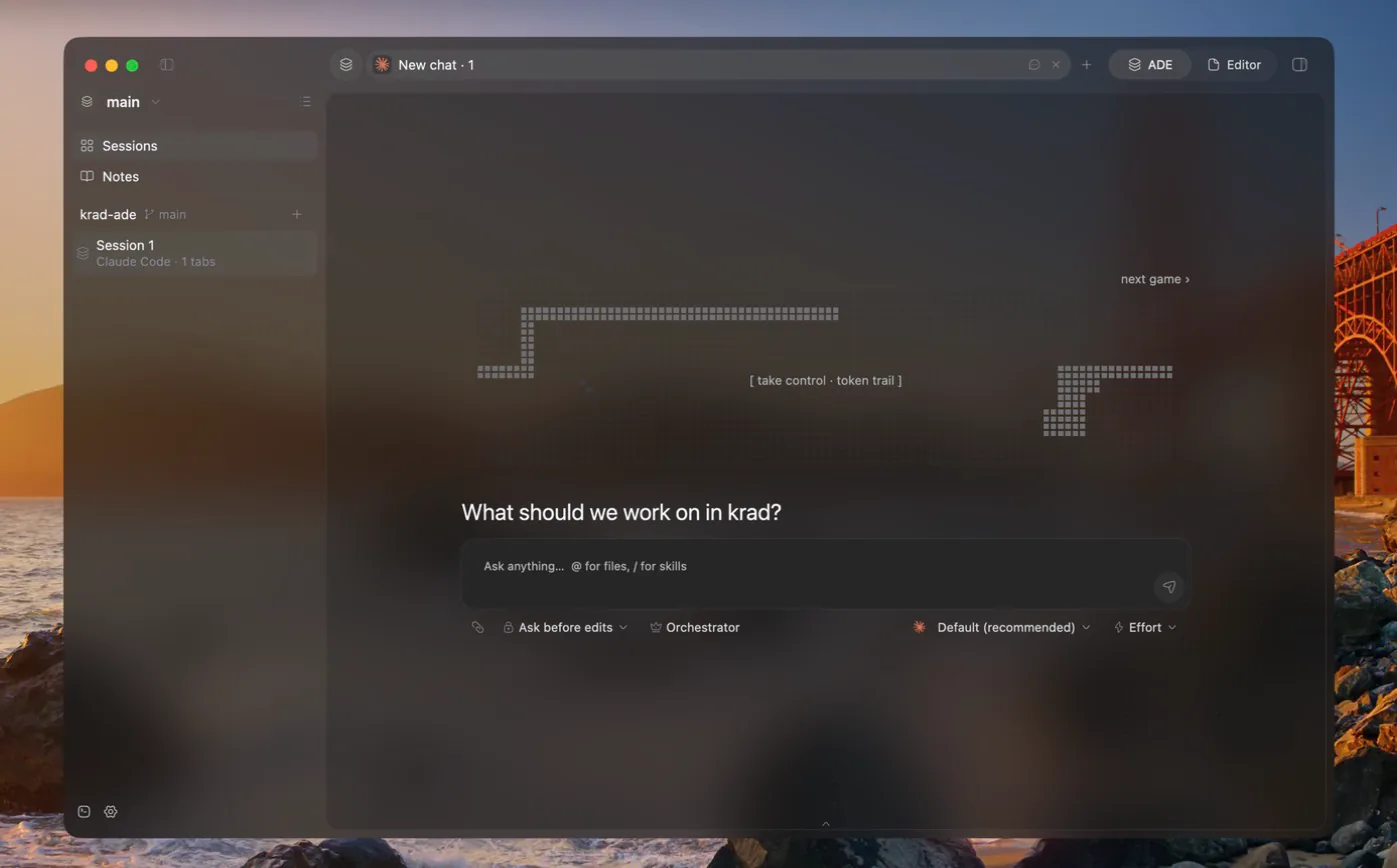
The composer
- Model and effort. Pick the model and the reasoning effort. The model picked before the first message decides which harness runs the chat.
- Mentions. Send a file, folder or image as context: type
@path, pick it, drop it or paste it. Images reach the model as images and other files by their path. Pasted images are kept with the chat and go with it when it is deleted. - Skills. Call skills with
/. - Queue. Messages sent while the agent works wait in a queue until the harness takes them.
- Orchestrator. The composer switch, labelled Orchestrator, that turns the chat into the session's lead. See Lead and Workers.
Asks
An ask is a tool call the chat waits on you for. While it waits it takes the place of the composer:
- a permission to run a tool;
- questions to answer by picking options or writing your own;
- the approval of a plan.
Press Enter to confirm and Escape to deny.
Permission modes
The permission mode decides how freely a chat may run tools without an ask. There are four: manual, accept edits, plan and auto. A chat starts on Claude Code's own setting and keeps the last mode you pick for it. Gateway chats judge every tool call, MCP tools included, against the same modes. See Gateway.
Checklists
The steps an agent tracks for its current work show above the composer and stay up to date as it goes.
Rewind
Rewind cuts a chat back to one of your messages: edit it, and the harness answers it again. It works only while the chat is idle. Each harness cuts its own history, and where it can restore files, the edit dialog offers "conversation and files":
| Harness | Rewinds the conversation | Restores files |
|---|---|---|
| Claude Code | Yes | Yes, through its file checkpointing, which the app turns on for its chats |
| opencode | Yes | Yes, through its revert |
| Codex | Yes | No, its revert keeps files |
| Gateway | Yes | Yes, through the engine's snapshots |
Subagents
A harness may start a subagent inside its own turn, with a fresh context. The chat shows it as a card; open the card to read the subagent's whole conversation.
Terminal view
Terminal view turns a chat's tab into the harness's own TUI on the same conversation, and back. It is offered once the first message has gone out and the harness has given the conversation its resume id.
- With Claude Code the switch happens in place, over the same conversation.
- With Codex and opencode the conversation reopens on the other surface.
- Gateway chats are chats only and have no terminal view.
See Terminals and panes for shells beside the chat.
The Arcade
Every empty chat shows the Arcade, a dot-matrix banner above its question, until the conversation starts. Each new chat draws one game at random, never the one shown last: byte run, bug hunt, line break or token trail. A game plays itself until you take control, a run ends at the first loss, and each game keeps its own best score across restarts.