

Notes
A vault of Markdown notes inside the group's repository, written by hand or generated by an agent from the code.
Notes are the group's notes and documentation as Markdown files in a vault inside its repository. A group has exactly one vault, the docs/notes/ folder. Notes and their subfolders live there, and anything a note embeds, such as images or videos, goes in its attachments/ folder. Because the vault is plain Markdown in the repository, git, the team, GitHub and agents can all read it.
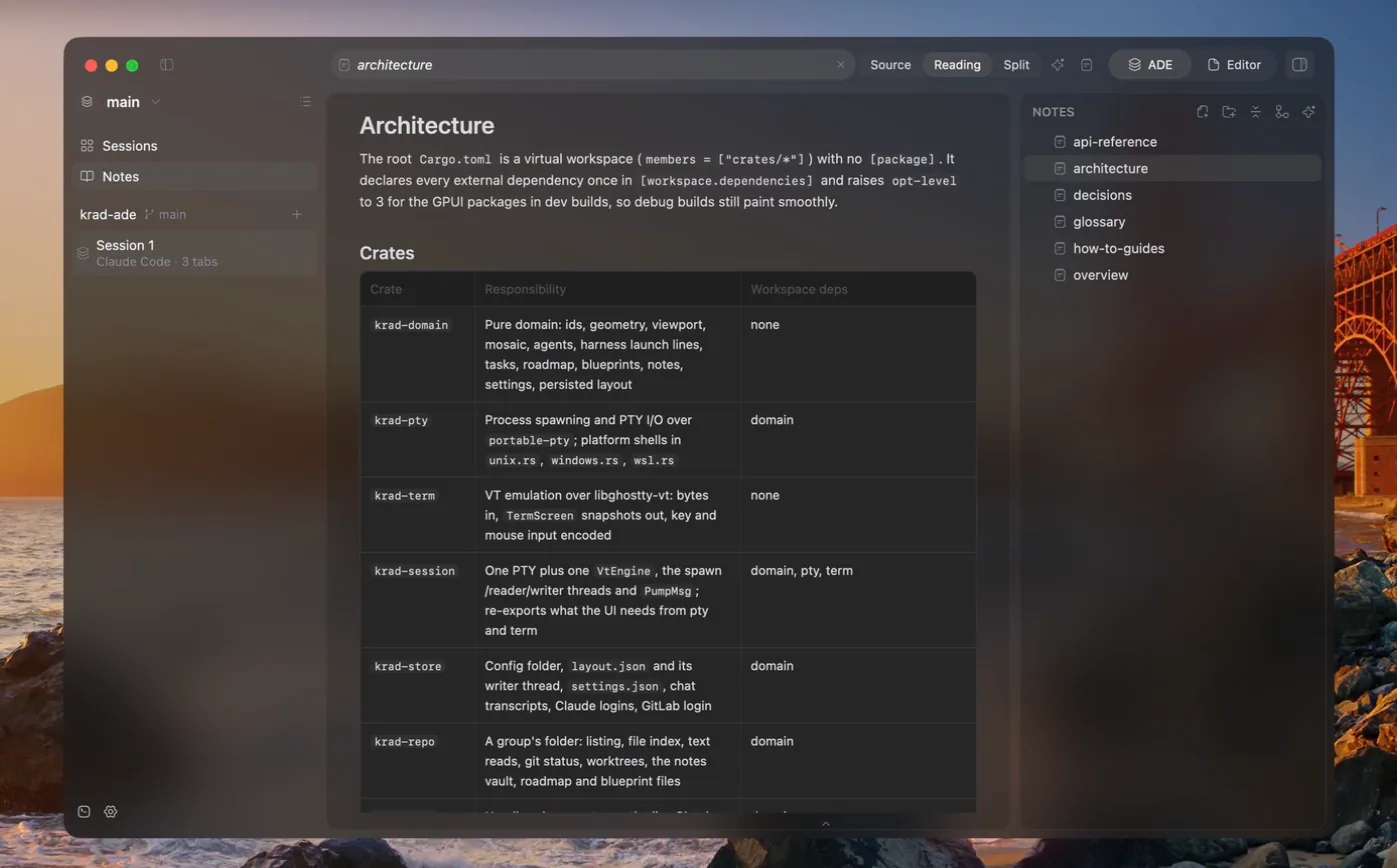
Writing
A note is written by hand as Markdown, with Markdown highlighting, in one of three modes:
| Mode | What it shows |
|---|---|
| Source | The Markdown itself; the default |
| Reading | The rendered note |
| Split | Source and reading side by side |
Notes open in tabs inside the Notes view, with a preview tab as for files. A note saves itself shortly after you pause typing. If an agent edits a note on disk, the open note reloads when you have nothing unsaved, and otherwise asks which version to keep.
Links and structure
- Notes understand wiki-style
[[Note]]and![[file]]links as well as ordinary[text](path.md)links. Links the app writes are always ordinary Markdown links, which GitHub and agents can follow. - A backlink is a note that links to the one open, seen from the note it points to.
- The front-matter is kept whole and edited as properties.
While the Notes view is open, its own sidebar replaces the side panel on the right. The sidebar shows the vault tree, plus an inspector you can open for the current note: backlinks, outline, tags, properties and a graph of nearby notes. A graph of the entire vault can be opened as a tab.
Reading view
The reading view renders:
- fenced code with syntax highlighting;
- LaTeX, in KaTeX syntax;
- Mermaid diagrams;
- callouts, foldable;
- embedded notes and linked footnotes;
- local and remote images;
- videos, as a card that opens the system player.
Tables and code blocks that are too wide get a horizontal scroll rather than wrapped lines.
Search
To search the vault or jump to a note by name, use the command palette: Cmd+K on macOS, Ctrl+Shift+P on Windows and Linux.
Generate notes with an agent
An agent can write documentation from the code into a vault folder you pick in the Generate dialog, and each note offers "Continue with an agent".
- Docs sources. Pick folders of the group whose existing documents feed the generated notes. The selection is saved in
docs/notes/sources.toml, so the team and agents share it. - Checked against the code. The agent reads them, compares their claims with the code, and cites them in the notes it writes. When a document says something the code contradicts, the note goes with the code and warns, in a callout, which document is out of date. The agent never edits the source documents.
- Provenance. A note an agent wrote records in its front-matter which model wrote it from which sources. Once you edit its body, it counts as edited by you.
Attachments are committed like any other file, so big ones make the repository's history grow. To avoid that, add attachments/ to the ignore file or keep it in Git LFS.
A group that still has an older docs/wiki/ folder has it moved to docs/notes/ the first time the app sees it.